
v3.1 of WP Help Scout Docs is a Serious Level Up
This release makes me proud.
Not because it adds flashy features.
Not because it changes everything overnight.
But because it makes the plugin feel… solid. More mature, predictable and flexible!
What started as fixing a small bug in WP Help Scout Docs turned into full-blown page builder support and maximum layout flexibility.
Let’s walk through it.
Table of contents
🐛 The “No Categories Found” Bug Is Gone
Some of you ran into this a “No categories found” error. While categories were clearly synced from Help Scout.
The issue wasn’t obvious. In certain setups — especially when sorting logic and page builders were involved — taxonomy queries could be unintentionally influenced by filters. In edge cases, get_terms() would return an empty array.
Technically correct. Practically wrong.
But, that’s fixed now.
Categories are fetched reliably, regardless of how you structure your templates or sort your content.
Quiet fix. Big impact.
⚡ Query Handling, Done Properly
While I was in there, I took a hard look at how the plugin handles queries. So, this update tightens things up.
Improvements include:
- Strict separation between main queries and secondary queries
- Safer handling of sorting logic, and
- Less unnecessary database overhead.
Overall, a cleaner codebase that increases compatibility with several setups.
🫶 Theme & Page Builder Support
Some of you requested more flexibility in customizing the layout and design of your documentation. So, I want to take this opportunity to introduce a new setting:
Theme & Page Builder Support
When enabled, WP Help Scout Docs uses the native WordPress archive structure instead of custom routing.
And that changes everything:
- Your documentation posts now behave like a normal WordPress posts.
- Your documentation archives (the base and categories) behave like WordPress archives, and last but not least
- You can use your favourite page builder to design your Documentation pages.
No routing hacks.
No rewrite gymnastics.
It integrates the way it always should have. And that makes the plugin feel significantly more grown up.
But, that’s not all…
🧱 Now with a Native Gutenberg Block
WP Help Scout Docs now includes a custom WP Help Scout Docs Categories block for the WordPress Gutenberg editor.
Drop it in. Done.
You can show categories in a grid layout or a clean list, optionally display a full or limited list of articles per category, control sorting, toggle excerpts, and a lot more — all without touching code.
It’s fully server-side rendered, so it behaves exactly like the rest of your site. Just clean, native WordPress.
My own documentation is powered by the Gutenberg block — so yes, I’m eating my own dog food. 🚀
🎨 A Proper Documentation Categories Widget for Elementor
On top of global support for your favourite page builders, and to show off the flexibility and possibilities, I built a custom WP Help Scout Docs Categories widget for Elementor.
And this is where things get fun.
Let’s just dive into a visual presentation, because in this case a picture really says a 1000 words.
Here’s what WP Help Scout Docs’ base page looked like before v3.1.x:
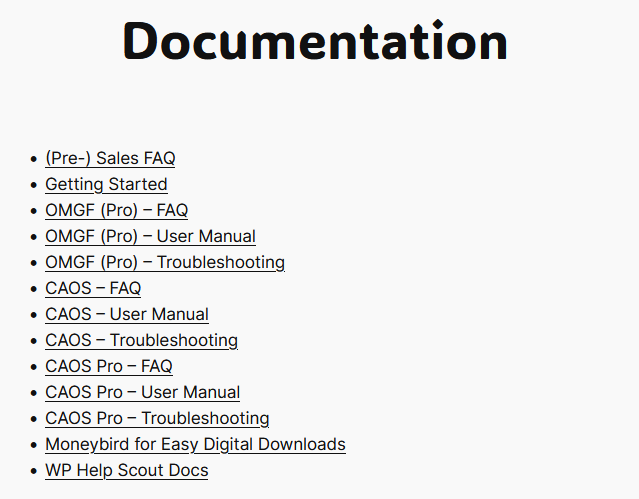
docs_base shortcode.Functional, boring, and only customizable using custom CSS. And now, an example of the powerful, flexible widget for Elementor:
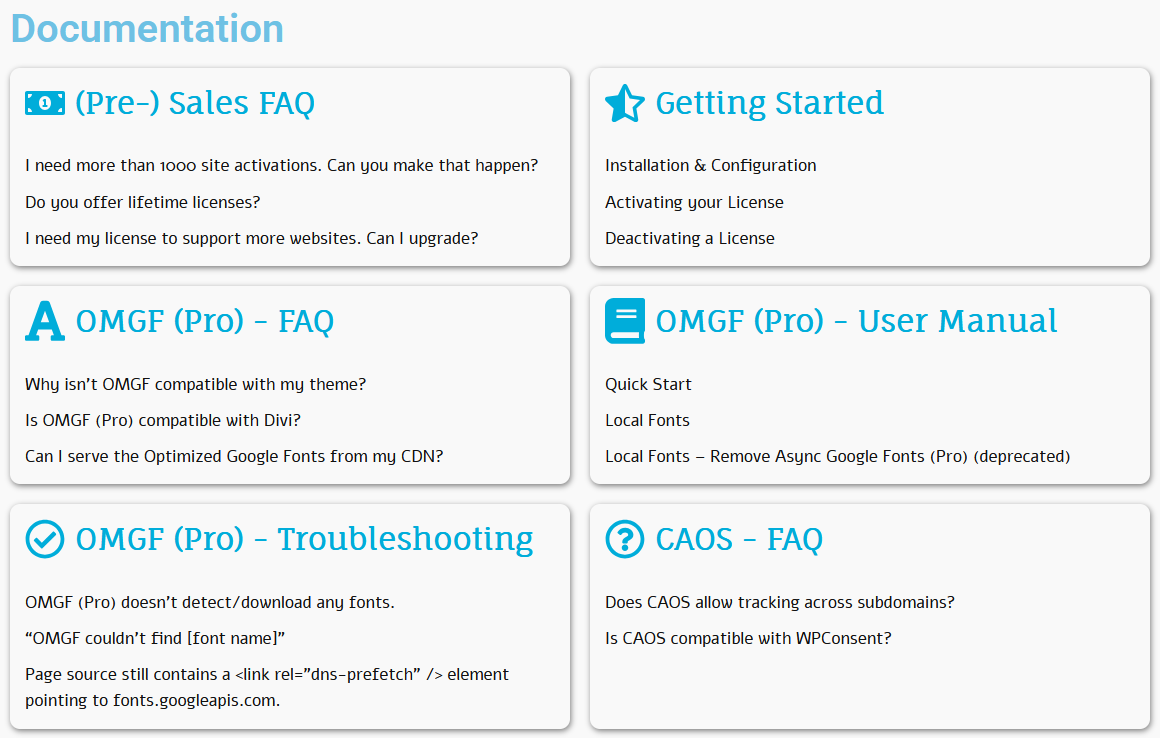
You can now:
- Display documentation categories in a responsive grid with as many columns as you like
- Display the number of articles per category
- Show a (limited or unlimited) set of articles per category, with an optional, customizable “Read More” link
- Sort articles by date, title, or menu order
- Toggle article excerpts with customizable length
- Assign custom icons per category
- Fully control typography, spacing, colors, shadow, border, border radius, etc.
All visually.
All inside Elementor’s Theme Builder.
No custom loops or code snippets.
🎉 Why This Release Matters
WP Help Scout Docs at its core has always been a sync bridge. And, it still is.
Help Scout Docs (now Knowledge Base) remains the source of truth. WordPress remains the presentation layer.
But this update turns the plugin into something stronger: a proper foundation for your documentation inside WordPress.
You can now keep full layout control in WordPress without added maintenance debt in the plugin.
That balance is important to me.
🔜 What’s Next?
Right now, the plugin integrates best with Elementor due to the custom widget.
But I’m exploring what similar integrations would look like for other popular page builders, including:
- Divi
- Bricks
- Beaver Builder
I’ll approach those the same way: clean integration. No bloat. No unnecessary abstraction layers.
One builder at a time. Done properly.
🎯 Conclusion
This release hits different. Not because it adds complexity. But because it removes friction.
It offers a better foundation, cleaner integration and more freedom.
If you’re already using WP Help Scout Docs, update it. If you’ve been looking for a Documentation plugin that properly integrates with your page builder — this is it.
And if you run into anything interesting while building with it, you know where to find me.