

Meet Smart Optimize: OMGF Pro v5.0 Loads the Right Fonts and Ditches the Rest 🧹
With 4-20 coming up, you have no idea how hard it was to ship this as v5.0 instead of v4.2.0. 🌿 But here we are. Professional as ever.
Let’s talk about fonts. Specifically, let’s talk about the ones quietly hitchhiking on your pages — loaded, parsed, and then completely ignored by the browser. Dead weight. Every single time. On every single page.
You’ve been hosting your Google Fonts locally for a while now. Good. That’s the easy part. But here’s the uncomfortable truth: hosting fonts locally doesn’t mean you’re only loading what you actually need. It just means you’re loading unnecessary stuff faster.
That’s not optimization. That’s just… tidier chaos.
Fortunately, OMGF Pro v5.0 automatically removes unused fonts from your WordPress site. Properly. And it comes with a shiny new feature in OMGF v6.2 that powers the whole thing.
Oh, and OMGF Pro is the first WordPress plugin to do this. Just saying.
Table of contents
📊 What’s New in OMGF v6: The Performance Checker
Before we get to the star of the show, meet its backstage crew: the brand new Performance Checker in OMGF v6.2.
The Performance Checker is a brand new addition to OMGF’s Google Fonts Checker — the feature that monitors your site for external Google Fonts requests and configuration issues. Until now, the Dashboard would only show you whether OMGF had detected and processed all Google Fonts correctly. In other words: it told you whether your setup was working.
But “working” and “optimized” aren’t the same thing. That’s why OMGF v6.2 takes it a step further. The Dashboard now also shows you how well your fonts are performing — and not just your Google Fonts. All fonts, regardless of where they come from.
The Performance Checker runs silently in the background on every page visit (for logged-in administrators) and figures out three things:
- Missing preloads — above-the-fold fonts that aren’t being preloaded yet, complete with an estimate of the LCP impact in milliseconds. LCP, or Largest Contentful Paint, is Google’s way of measuring how fast the most important content on your page loads. Fonts play a huge role in this.
- Unused fonts — font faces defined in your stylesheets that the browser never actually renders on this page
- Unused subsets — Google Fonts come in multiple language variants, called subsets. Think Latin, Latin Extended, Cyrillic, Vietnamese, and so on. If your site is in English, you don’t need any of those extras. The Performance Checker detects which ones are loaded but never used.
The results show up directly in the admin bar stoplight. Green? You’re golden. Anything else? There’s work to do — and OMGF will tell you exactly what.

Think of it as a font auditor that never sleeps, never complains, and doesn’t charge by the hour.
🧠 Enter Smart Optimize: Automatically Remove Unused Fonts from WordPress
So, OMGF v6.2 tells you what’s wrong. OMGF Pro v5.0 fixes it — without you lifting a finger.
Smart Optimize is OMGF Pro’s fully automated, per-page font optimization engine. It’s the first feature of its kind in any WordPress plugin — and it works in three distinct ways.

⚡ Smart Preload
Preloading fonts tells the browser: “This file is important — grab it early.” Done right, it makes your site feel snappy and polished. Done wrong, however, it just adds unnecessary overhead.
Smart Preload scans every page for fonts that are rendered above the fold — the part your visitors see immediately, without scrolling. It then automatically configures OMGF Pro to preload exactly those fonts. Not the whole family. Not all weights. Just the ones that matter, on that specific page.
As a result, you get faster LCP, less FOIT (Flash of Invisible Text), and no more font-related layout jank.
🗑️ Smart Unload: Automatically Remove Unused Fonts
Every theme and plugin has its own idea of which fonts you need. Spoiler: they’re usually wrong. Consequently, you end up with font weights and styles defined in your stylesheets that never appear anywhere on your actual pages — but the browser still has to process them.
Smart Unload scans the entire page and identifies font faces that are defined but never rendered. Then it automatically removes unused fonts from your stylesheet entirely. Automatically. Per page.
The result? Less CSS bloat. Fewer bytes. Cleaner output. Your visitors get exactly what they need — nothing more.
🌍 Smart Subset
Google Fonts come in multiple language variants, called subsets. A single font family can include Latin, Latin Extended, Cyrillic, Greek, Vietnamese, and more. Each subset adds weight to your stylesheet.
If your site is in English, you don’t need Cyrillic. Similarly, if your site is in Dutch, you definitely don’t need Vietnamese. Yet, most optimization tools load all subsets anyway — because they don’t know which ones you actually use.
Smart Subset does. It detects which subsets are actually rendered on each page and removes the rest. Automatically. No configuration needed.
Smart Subset requires your font stylesheets to define unicode-range values — which is standard for Google Fonts served by OMGF. Fonts loaded via plugins like WP Font Manager that don’t define unicode-ranges are still fully optimized by Smart Preload and Smart Unload, but subset stripping won’t apply.
🗂️ What’s Changed in This Release
Two features didn’t make it to v6.2 and v5.0 — and that’s intentional.
Run Google Fonts Checker in the Background has been removed. Previously, this option allowed OMGF Pro to run the Google Fonts Checker for non-logged-in visitors as well. Now that Smart Optimize is here, this happens automatically whenever Smart Optimize is enabled. No separate toggle needed.
Auto Subsets has also been removed in OMGF v6.2. This feature would check which subsets were requested and verify whether they actually existed. A nice idea in theory — but in practice, Smart Subset does the same thing, better. Instead of just checking whether subsets exist, Smart Subset detects which ones are actually rendered on each page and strips the rest. It’s the smarter, more thorough replacement.
In short: both features have been absorbed into Smart Optimize and replaced by something more powerful. Less clutter in the settings screen, more automation under the hood.
⚙️ How It All Works Together
When you enable Smart Optimize, OMGF Pro loads a small JS snippet on the frontend. On the first visit to a page:
- It scans all font faces defined in your stylesheets
- Next, it checks which ones are used above the fold, across the entire document, and in which subsets
- Then, it sends the results to the Smart Optimize API
- As a result, OMGF Pro generates a lean, filtered stylesheet — with the right preloads configured on top
On the next page visit (or after a reload), it’ll load lean stylesheets, correct preloads, unused fonts and subsets nowhere to be found. Your visitors won’t notice a thing — except that your site feels faster.
✅ What Gets Optimized
Smart Optimize works across all of OMGF Pro’s detection methods:
- Standard Google Fonts
- Async Stylesheets and WebFont Loader
- Local Stylesheets
- External Stylesheets
- Inline Stylesheets
- Material Icons—removed entirely if unused. No half measures
🚦 The Admin Bar is Your Control Center
You might remember the admin bar stoplight from OMGF v6. Previously, it would flash orange or red when it detected external Google Fonts requests or configuration issues that needed your attention. Useful — but limited.
In OMGF v6.2, the admin bar gets a significant upgrade. It now also acts as a per-page performance monitor. On every page visit, it shows you a brief analysis of how your fonts are performing right now, on this specific page:
- How many fonts should be preloaded — and what the estimated LCP impact is
- How many unused fonts are still being loaded
- How many unused subsets are still present
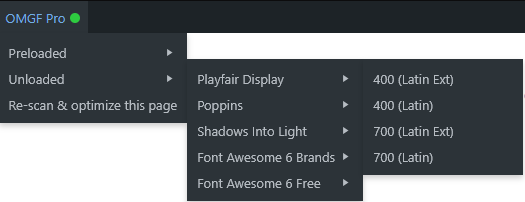
When OMGF Pro is installed and active and once Smart Optimize has done its magic, the stoplight turns green. Hover over it and you’ll see exactly which fonts were preloaded and which were unloaded — grouped by font family, with human-readable subset names. No cryptic file paths. Just clean, actionable information.
And if you’ve redesigned a page and need a fresh analysis? Simply hit Re-scan & Optimize this page in the admin bar. OMGF Pro wipes the existing data and starts over. Done in seconds.
🚀 How to Enable Smart Optimize
- Update to OMGF v6.2 and OMGF Pro v5.0
- Go to Settings > OMGF Pro
- On the Local Fonts tab, enable Smart Optimize (Pro)
- Hit Save & Optimize
That’s genuinely it. No catch.
💬 Final Thoughts
OMGF v6.2 tells you what’s wrong. OMGF Pro v5.0 fixes it — automatically, per page, across every font loading method your theme or plugins throw at it.
Smart Preload, Smart Unload and Smart Subset. Together, they automatically remove unused fonts, load the right ones, and cover the full picture — the right fonts, at the right time, on every page, with nothing extra.
No other WordPress plugin does this. And now you know why v5.0 deserved a proper version bump.
Bugs, ideas, love letters? You know where to find me.





Fantastic! I’ve been looking forward to this update for quite a while. Thanks, Daan! What about caching, though? What should I keep in mind to ensure the cache (for instance when using Cloudflare) stays up to date with the plugin’s crawling work?
Hi Giulio!
Coincidentally, I ran into the same thing yesterday and I’m currently researching the possibilities. I think I’ll implement a cache flush (for that page, of course) right after Smart Optimize has run. I’ll support the most popular plugins. I think Cloudflare has a WP plugin, too, right? Cause that’d be a way for me to support it. If you’re running CF without the plugin (I do that, too) then you’d have to flush the cache manually after running it for a while.
It would be handy to have a notification when Smart Optimize has finished all its work—perhaps a notice on the WordPress dashboard. At that point, one could manually flush the cache. I completely understand that Cloudflare operates independently and needs to be handled accordingly. It seems like a workable solution to me, though I’d be interested to hear your thoughts.
That’s a good one! Maybe both? A flush per page for popular plugins (to make sure optimizations come through ASAP for most people) and a full cache flush once all pages have been optimized. Either way, thanks for the suggestion!
I just released v5. 1 which refreshes the cache of that page, when Smart Optimize finishes its optimizations.
Check the changelog to see which optimization plugins are supported!