

WordPress Plugin Security is no longer an afterthought. It’s a feature.
AI changed the way I build software. Features that used to take me a week now take a day. Bugs that used to take an afternoon to track down now take minutes. I’m not going to pretend otherwise: it’s the most powerful tool I’ve added to my workflow in all the years I’ve been building WordPress plugins. But every powerful tool cuts both ways, and the other edge of this one is WordPress plugin security.
The same tool, on both sides
When you ship faster, you review less. Code that used to pass through your head line by line now arrives in bulk. It works, the tests pass, and that one unescaped value or missing capability check slips through.
Meanwhile, the people on the other side got the same upgrade. Finding a vulnerability used to take skill, time and patience. Today, anyone can point an AI at a plugin’s source code and ask where it’s weak. Scanning thousands of plugins for the same mistake is a weekend project now.
Unfortunately, I learned that the hard way. Earlier this year, a vulnerability in OMGF Pro was actively exploited in the wild. The attack was fully automated, written specifically for my plugin, and went from first request to full server access in about 15 seconds.
I’m not alone. Much bigger WordPress plugins, like Elementor, deal with the same security pressure, and WordPress core itself ships security releases more often than ever. This isn’t a coincidence. Instead, it’s a side effect of an amazing new tool.
WordPress plugin security needs a mentality switch
I think I speak for most open source developers when I say: nobody taught us security. We started building something because we needed it, shared it, and people started using it. Security came later, one lesson at a time. Usually right after a mistake.
There’s nothing wrong with that, as long as you learn from those mistakes. It’s how I learned most of what I know.
But that approach assumes you have time. Time between shipping a mistake and someone finding it. Time to learn, patch and release before anyone abuses it. That window used to be months. Today, it can be hours.
So we can’t treat security as something we pick up along the way anymore. It has to be part of everything we do: every feature, every refactor, every release. If we don’t, we’ll always be running behind the facts, patching exploits after they’ve hit our users’ sites. And that’s a terrible place to be, for us and for them.
Why WordPress plugin security should now be considered a feature
We tend to think of features as things users can see: a new setting, a faster page, a nicer dashboard. Security is invisible when it works. That’s exactly why it ends up at the bottom of the list. But it belongs at the top, for a few reasons:
- Your users trust you with their entire site. A WordPress plugin runs with the same access as WordPress itself. One weak spot in one plugin is enough to hand over the keys to everything.
- Every other feature depends on it. The best Google Fonts optimization in the world is worthless on a hacked site.
- Fixing it later is always more expensive. A proactive fix is a changelog entry. A reactive fix is an emergency release, cleanup guides, support tickets and in the worst case: lost trust.
- Your users can’t check it themselves. They can see that a page loads faster. They can’t see a missing capability check. Security is something you do on their behalf, so it deserves the same attention as anything they asked for.
- Attackers don’t care how popular you are. Automated tools scan everything. Small plugins are targets too, precisely because they’re less likely to be audited.
Take the lead on WordPress plugin security with CTX7
If attackers use AI to find weaknesses, I can use it to find them first. So I had OMGF and OMGF Pro fully audited, using CTX7.
CTX7 gives an AI coding agent a real development environment on your own machine: a sealed-off sandbox where it can build, run and test entire applications, check its own work in a real browser and fix what breaks. That last part is what made the difference. An AI that only reads code gives you guesses. An AI that can spin up WordPress, install the plugins, send the request and watch what happens gives you proof.
Here’s how the audit worked:
- A fresh test site. CTX7 set up a WordPress install with OMGF and OMGF Pro running straight from their Git repositories, plus both plugins’ full test suites.
- Parallel reviews. Several AI reviewers each took one part of the attack surface: the REST and AJAX endpoints, the frontend optimization pipelines, file handling, the settings screens and the included license manager.
- Verification. CTX7 traced every finding back to the source code and, where possible, reproduced it on the test site. Anything it couldn’t prove, it dropped.
- Fix, test, prove. Each fix got its own pull request, with a test that fails without the fix and passes with it.
- A second opinion. CodeRabbit reviewed every pull request, and CTX7 verified and addressed its remarks in the same way.
- End-to-end testing. Finally, CTX7 tested the changes in a real browser: logged in, logged out, and everything in between.
We did this twice: a first round using Opus 4.8, and a second, deeper round, using Opus 5.5, that also checked whether the first round’s fixes could be bypassed. A few of them could. That’s exactly why you do a second round.
What changed in OMGF 6.3.12 and OMGF Pro 5.3.0
I won’t go into the technical details, since all of these were found before anyone else did and I’d like to keep it that way. Sorted from low to high priority:
| Priority | Plugin | What changed |
|---|---|---|
| Low | OMGF | OMGF escapes admin notices and stylesheet names on the settings screen. |
| Low | OMGF | The redirect after saving settings only goes to your own site. |
| Low | OMGF Pro | OMGF Pro sanitizes and escapes responses from the licensing server before showing them. |
| Medium | OMGF Pro | All license actions require administrator rights, and the connection to the licensing server is verified. |
| Medium | OMGF | OMGF validates downloaded font files before storing them, and reports failed downloads on the Dashboard. |
| Medium | OMGF | OMGF reads stored settings more strictly, and the settings form can no longer change data that OMGF generates. |
| Medium | OMGF Pro | Decoding a stylesheet URL can no longer change the host it points to. |
| Medium | OMGF Pro | Smart Optimize only preloads fonts from hosts your site already uses, or hosts you’ve approved yourself. |
| High | OMGF | OMGF strictly validates Google Fonts stylesheet requests, and never writes downloaded font files outside its cache folder. |
| High | OMGF Pro | OMGF Pro fetches external stylesheets over a safe request that rejects internal and private hosts. |
| High | OMGF & OMGF Pro | Only administrators can store results or start an optimization through the Admin Bar Menu, even when Smart Optimize is on. |
Along the way, the audit also turned up a few non-security improvements, like better detection of icon fonts and variable fonts, and fonts loaded from other domains. Those are in the changelogs too.
Failed downloads don’t fail silently anymore
This is one of those fixes you can actually see. OMGF now checks every font file it downloads before it stores it. If Google’s servers send back an error page instead of a font, or the file is empty or suspiciously large, OMGF doesn’t store it. Instead, it shows a fallback font and tells you about it on the Dashboard, including which file failed and what you can do about it:

Before, a failed download went unnoticed until a visitor saw the wrong font. Now, you know about it right away.
New in Smart Optimize: you decide which font hosts to trust
One of those fixes grew into a feature. Smart Optimize learns from your visitors which fonts each page needs and preloads them, including fonts from 3rd party hosts, like icon packs and font providers. But OMGF Pro adds a preload to the page for every visitor, so it should never preload a font from a host you don’t know.
So from now on, Smart Optimize only preloads 3rd party fonts from hosts your site already loads stylesheets or scripts from, or hosts you’ve approved yourself. When you browse your own site as an administrator, Smart Optimize automatically approves the hosts of the fonts it finds. Everything else waits for your approval.
When Smart Optimize finds fonts on a host it doesn’t know yet, the stoplight in the admin bar turns blue:

On the Dashboard, you choose to trust or ignore each host:

You’ll find your trusted and ignored hosts right below the Smart Optimize option. Changed your mind? Remove a trusted host, or trust an ignored one, with a single click:
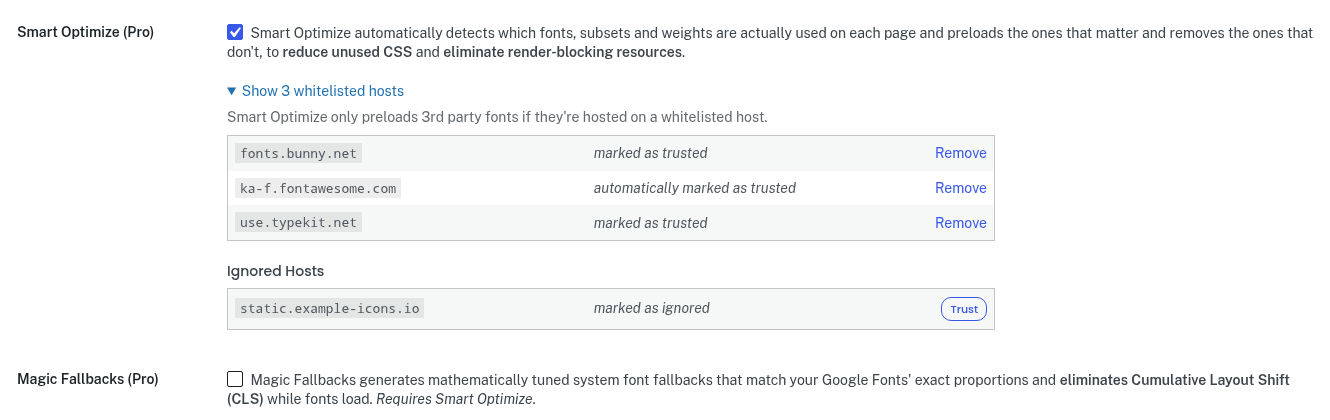
It’s a small thing, but it’s exactly what security as a feature looks like: you stay in control, without having to think about it.
What this means for you
If you use OMGF or OMGF Pro: update to OMGF 6.3.12 and OMGF Pro 5.3.0. That’s it. No settings to change, nothing to reconfigure.
If you’re a developer: don’t wait for your plugin to show up in someone’s exploit kit. The same tools attackers use to find your mistakes are available to you, today. Use them to audit your own code, and make WordPress plugin security part of how you work, not something you do once after things go wrong.
For me, this audit isn’t a one-off. From now on, every release of OMGF and OMGF Pro goes through the same process. Because security is no longer an afterthought. It’s a feature.






Hello Daan,
Last week I saw Andreas Gaertner’s TEDx talk in Göttingen, and your post reminds me of his call: Cry or Create – you can complain about what happens to your job, or you can shape what comes next. Your audit is a fine example of the second.
It also brings to mind Rainer Petek’s talk about AI as a rope partner. In climbing, the lead climber trusts their life to the person holding the rope. AI can’t take that role, because it has nothing at stake. So the responsibility stays with us.
Both talks are in English and not online yet. I’ll share the links as soon as they’re available.
Let’s use AI for the legwork while we lead the way into a future worth living in.
Cheers,
René
Exactly. It’s a tool, and it should be viewed as such. People who trust their product/live with a tool are, well, tools themselves. LOL