WP Help Scout Docs v3.5 Answers Your Customers Before They Even Ask 🔮
In February I wrote that v3.1 of WP Help Scout Docs made the plugin feel solid. Mature. Grown up.
Well. Turns out the grown-up was still deleting all your docs every time you clicked a button. More on that later. 🙈
v3.5.0 is out, and it’s the biggest update WP Help Scout Docs has ever had. It answers your customers’ questions while they’re still typing them. It syncs without taking your docs offline. It makes every page of your documentation look the same. And it stops your visitors from talking to Help Scout’s servers behind your back.
Let’s dive in.
Table of contents
🔮 Form Integration: Answers Before They Hit Send
You know the drill. You spend hours writing documentation, so people don’t have to e-mail you. Then they e-mail you anyway, asking the exact thing you explained in article #3. With screenshots. And a GIF.
I know the drill too. I run a support inbox. 😅
So I built Form Integration. While visitors type the subject in your contact form, matching docs show up right below it. Maybe they find the answer right away. Maybe you get one ticket less. Maybe you finally get to drink your coffee while it’s hot. ☕
Setting it up takes about a minute:
- Enable Form Integration in the settings.
- Set the Results Header Text (or keep the default).
- Add the CSS class
wp-help-scout-docs-searchto the subject field of your form.
That’s it. It works with any forms plugin that lets you add a CSS class to a field: WPForms, Gravity Forms, Contact Form 7, Fluent Forms, Ninja Forms, Formidable Forms, you name it.
A few things I’m quietly proud of:
- Smart ranking. Results are ranked by keyword. A match in a title counts three times, and rare words weigh more than common ones. So “need invoice” finds the article about invoices, not every article that happens to contain the word “need”. (I get that one about ten times a month. Now my docs can answer it. 🧾)
- The form stays put. Only docs are searched, and links open in a new tab. Nobody loses the message they were halfway through.
- Accessible. Screen readers announce the results as they appear.
- No bloat. The script only loads on pages that actually have such a field.
🔄 Sync Docs: Your Docs Never Go Offline Again
Confession time.
The old (Re)build Docs button did exactly what it said on the tin. It threw all your docs away, and then built them again. For a few seconds (or minutes, with a big collection), your documentation simply… wasn’t there.
Technically correct. Practically a terrible idea. I’m sorry. 😬
It’s now called Sync Docs, and it works the way it always should have:
- Articles and categories are updated in place, so your docs stay online during a sync.
- Articles are only touched when they actually changed in Help Scout.
- Changed a slug in Help Scout? The old URL redirects (301) to the new one. Your SEO says thanks.
- If the Help Scout API hiccups or a sync gets interrupted, nothing is deleted. Articles that no longer exist in Help Scout are only removed after every article was processed.
- Syncing runs in steps with a progress bar. Two syncs can’t trip over each other, and if you closed the tab halfway, the settings screen tells you.
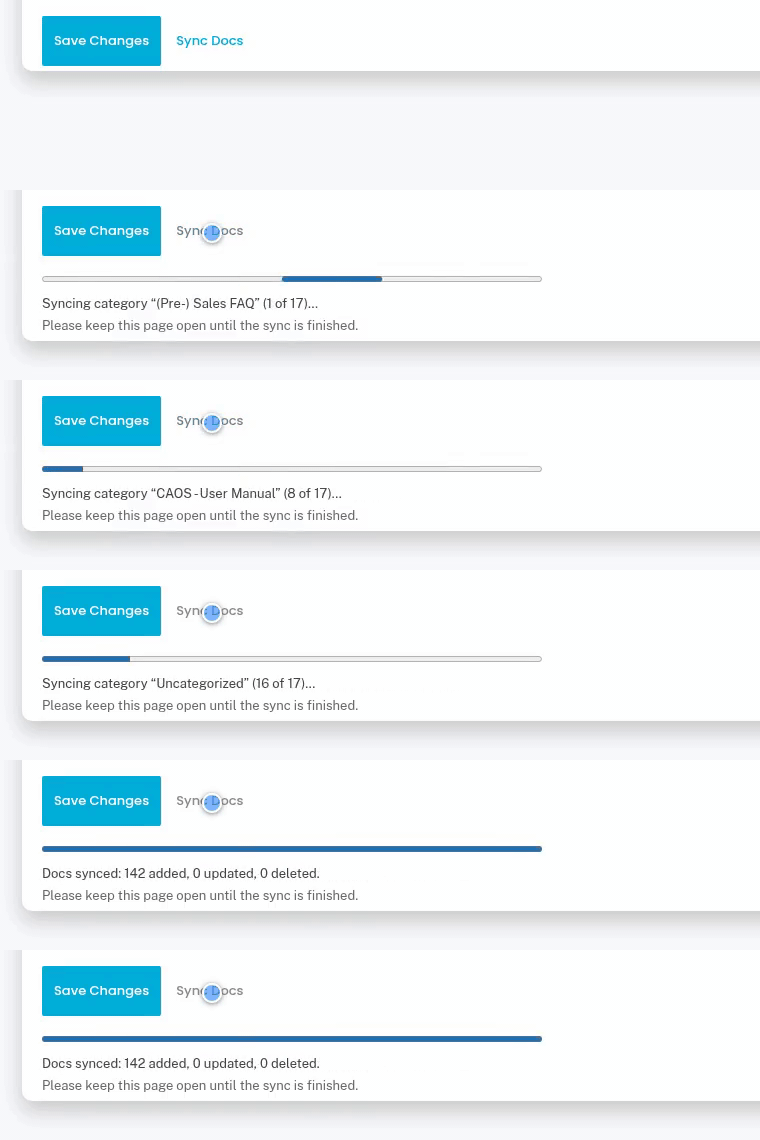
And while I was in there, I found a bug that made me laugh and cry at the same time. Categories with more than 100 articles were only synced up to article #100. Apparently, past me figured nobody would ever write that many docs. You did. Fixed! 🤦
⏰ Set It and Forget It
Clicking Sync Docs after every edit in Help Scout gets old fast. So now there’s Sync Docs by Schedule: daily, twice weekly, weekly, twice monthly or monthly. WP-Cron does the clicking for you.
Managing a bunch of sites? Set it with the WP_HELP_SCOUT_DOCS_SCHEDULED_REBUILD and WP_HELP_SCOUT_DOCS_REBUILD_SCHEDULE constants, and the schedule starts on its own. No admin visit required.
🎨 Every Page Looks Like It Belongs
In v3.1 I introduced the Help Scout Docs Categories block for Gutenberg. Your Documentation page looked fantastic. Then a visitor clicked a category… and landed on a page that looked like it was designed in 2009. By me. In a hurry.
Not anymore. If your Documentation page uses the block, category pages now follow its design: the same block with the same settings, for that one category.
- Classic themes: the category page uses your theme’s template for the Documentation page (header, layout, sidebar). No template overrides needed. Got your own
taxonomy-hs-docs-category.php? That still wins. - Block themes: you get a brand new Help Scout Docs Category template.
Docs search results (e.g. with Restrict Search) join the party too: the articles found, grouped by category, in the same order as in Help Scout. That one is for classic themes; block themes keep their own search template.
Using the docs_base shortcode, Elementor, your own content or Theme & Page Builder Support? Then nothing changes. Everything works exactly like before.
🕵️ Your Visitors Don’t Talk to Help Scout Anymore
If you know me from OMGF, you know I’ve spent years nagging people about websites leaking visitor data to third parties. So imagine my face when I realized my own plugin was doing it. 🫣
Every image in your docs was loaded straight from Help Scout’s servers. So every visitor of your documentation connected to Help Scout, and sent along their IP address. Hello, GDPR. 👋
Now, images in your articles are stored locally (in wp-content/uploads/wp-help-scout-docs) and served from your own website.
- Existing articles are updated in the background after updating, or the first time they’re viewed.
- Images that can’t be downloaded keep their original URL and are retried later.
- Only images uploaded to Help Scout Docs are downloaded: JPEG, PNG, GIF, WebP and AVIF, up to 10 MB. Images hotlinked from other sites and SVGs are left alone.
🗜️ And Lighter, Too
Since those images live on your server now anyway, why not make them faster? The new Compress Images option (on by default) saves them as WebP and resizes anything wider than 2000 pixels. That 4K screenshot of a settings screen? It doesn’t need to be 4K. 😉
It uses WordPress’ own image editor (GD or Imagick), so there’s nothing extra to install. Animated GIFs are left as they are, because nobody wants a GIF that doesn’t move.
Privacy and performance in one go. My favourite kind of feature.
🇳🇱 Oh, and One More Thing
WP Help Scout Docs now speaks Dutch, including the Categories block’s labels in the editor. Being Dutch myself, it’s a bit embarrassing this took until v3.5. Beter laat dan nooit! 🧀
🎯 Go Get It
To sum it up, v3.5.0 brings you:
- Form Integration, which shows matching docs while visitors type their question
- Sync Docs, which never takes your docs offline, plus Sync Docs by Schedule
- Category pages and search results that follow the design of your Documentation page
- Local images, so your visitors don’t connect to Help Scout
- Compress Images, for lighter, faster docs
- A Dutch translation
Help Scout is still the source of truth. WordPress is still the presentation layer. But now your docs also help keep your inbox quiet. 🤫
Already using WP Help Scout Docs? Update to v3.5.0 from your Plugins screen. New here? Grab it on the WP Help Scout Docs product page, and check the documentation to get started.
And if Form Integration does get rid of a few tickets for you, let me know. Through the contact form, obviously. 😜