

OMGF Pro
Google Fonts look great. But out of the box they leak your visitors’ IP addresses to Google, slow down your pages and make your text jump around while they load.
OMGF Pro fixes all of that. It’s a complete Google Fonts optimization suite for WordPress: it finds every Google Font on your site, hosts it locally, and then keeps optimizing it, page by page. Click one button, tick two boxes, and then it takes it from there.
GDPR compliant Google Fonts
When a visitor’s browser loads a font from Google’s servers, Google receives their IP address. On January 20th, 2022, a German court ruled that this breaches the GDPR (DSGVO), because it exposes personal data to a US based company without a good reason.
So the only way to keep using Google Fonts is to host them yourself. The free version of OMGF already does that for fonts added the “WordPress way”. But themes and plugins love to load Google Fonts in all sorts of creative ways, and those slip right through.
Not with OMGF Pro, though.
Every Google Font. Wherever it’s hiding.
OMGF Pro digs deeper. It finds Google Fonts in @import and @font-face statements, in your theme’s and plugins’ stylesheets (also when another domain hosts them), in inline styles, and in fonts that JavaScript or the WebFont Loader adds. Besides that, it handles Material Icons and Material Symbols, fonts from Bunny Fonts and WordPress.com, and the fonts in WordPress’ own Font Library.
Also, you don’t have to tell it where to look. Instead, click Save & Optimize once, and OMGF Pro scans your site, figures out how your fonts are loaded, and switches on everything it needs. Afterwards, the Dashboard tells you exactly what it found. From then on, OMGF Pro processes every page automatically.
Whether you build with Elementor, Divi, Avada, Bricks, Beaver Builder or a block theme, OMGF Pro has you covered.
Smart Optimize: faster pages, page by page
Most sites load the same fonts on every page, whether that page uses them or not. Smart Optimize looks at what each page actually shows, separately for mobile and desktop, and optimizes it accordingly:
- It preloads the fonts your visitors see first (above the fold), so your text appears faster and your Largest Contentful Paint improves.
- It removes the font weights and styles the page doesn’t use. And if a whole stylesheet turns out to be unused, OMGF Pro skips it altogether. As a result: less CSS, fewer requests.
Just switch it on. Smart Optimize then analyzes each page once, on its first visit, and uses the result for every visitor after that. It also clears your page cache automatically, whether you use WP Rocket, LiteSpeed, W3 Total Cache, FlyingPress, Kinsta, SiteGround or Cloudflare. No manual tuning, no font-by-font configuration. Just faster pages.
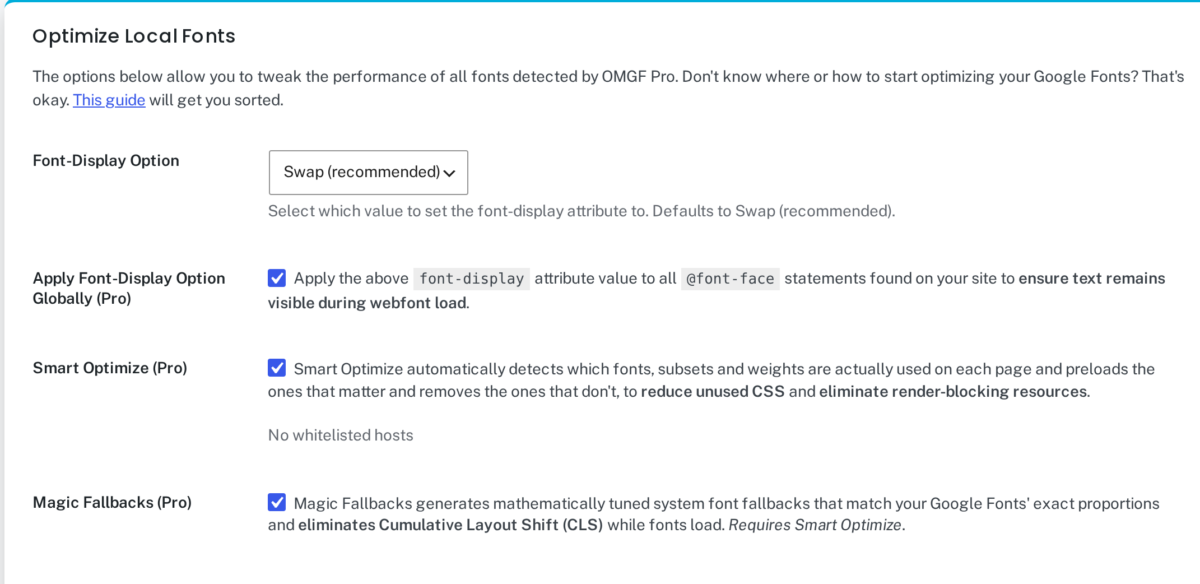
Magic Fallbacks: no more jumping text
You know the feeling: you start reading, the font loads, and the whole page jumps. That’s Cumulative Layout Shift, and Google doesn’t like it any more than your visitors do.
Magic Fallbacks creates a fallback font for every Google Font on your site, mathematically tuned to its exact proportions. While your Google Font loads, your visitors read the text in a system font that takes up (almost) exactly the same space. When the real font arrives, nothing moves. OMGF Pro also adds these fallbacks to every font stack on your site, including your theme’s, your page builder’s and your inline styles.
Then add Apply Font-Display Option Globally on top, which sets font-display to swap for every font on your site (not just Google Fonts), and your text is visible right away, without the jump.
OMGF Pro vs. Other Plugins
| Other Plugins | OMGF (free) | OMGF Pro | |
|---|---|---|---|
| Self-host Google Fonts enqueued by themes and plugins | ✅ | ✅ | ✅ |
Google Fonts in the HTML (<head> and <body>) | ❌ | ✅ | ✅ |
| Remove resource hints (preconnect, dns-prefetch, preload) | ❌ | ✅ | ✅ |
| @import and @font-face statements (inline or in stylesheets) | ❌ | ❌ | ✅ |
| Fonts loaded with JavaScript (incl. WebFont Loader) | ❌ | ❌ | ✅ |
| Material Icons and Material Symbols support | ❌ | ❌ | ✅ |
| Bunny Fonts, WordPress.com fonts and the WordPress Font Library | ❌ | ❌ | ✅ |
| Smart Optimize (automatic, per page, per device) | ❌ | ❌ | ✅ |
| Magic Fallbacks (automatic metric-matched fallback fonts) | ❌ | ❌ | ✅ |
| font-display set to swap for every font on your site | ❌ | ❌ | ✅ |
| Multisite, WPML and TranslatePress support, out of the box | ❌ | ❌ | ✅ |
Built for professionals
The “Pro” isn’t just for show. Whatever Google Fonts challenge your clients’ sites throw at you, OMGF Pro handles it. It also fits right into the way you work:
- Developer Mode makes moving a site between development, staging and production painless: no refreshing caches after every deploy.
- Multisite, WPML and TranslatePress work out of the box.
- Modify Source URL lets you serve your fonts from a CDN, or from a custom path when you rewrite your
wp-contentor uploads folders. - White-label Stylesheets removes all branding from the generated CSS. Your clients’ sites, your name.
It keeps an eye on things for you
Installed a new plugin that sneaks in another Google Font? Then the free Google Fonts Checker spots it, and the stoplight in your admin bar lets you know. The Font Performance Checker tells you when fonts are slowing down a page, and with OMGF Pro, Smart Optimize fixes exactly those issues for you.
So you can get back to building great websites, while OMGF Pro makes sure your fonts are fast, stable and GDPR compliant. Everywhere. All the time.

 Absolutely love this plugin!
 Awesome plugin!
 Excellent support for a great plugin
 Useful plugin and great support
 OMGF Pro -- excellent plugin
 Way to go, Daan!